Learning designer and educational psychologist

Yarlenys Coral Lozano

I design for the learner who struggles most. What helps them learn ends up helping everyone.

Educational psychologist with a master's in learning difficulties and language disorders.

13 years teaching children, teens, adults, and teachers, in English and Spanish.

Founder of four learning products, from gamified kids' platforms to an AI conversation tutor.

AI-native builder who designs and builds every product herself with AI tools, down to an AI clone of her own voice.

210 children and adults served across my academies, with about 90% still active after three months. 46 people downloaded Coral AI with no paid ads. 23 teachers are starting Montessori Guide this month.

For kids ages 4 to 13

CogniMight Academy

Founder & learning designer
2022 to present

A language-learning universe built for children with dyslexia and ADHD, which turned out to work for every child.

The problem

In my classes I kept meeting children who wanted to learn but couldn't concentrate or read as expected. Most language programs treat them as the exception. They drift, lose confidence, and quit.

The design

I built the program around them: multisensory, structured lessons based on Orton-Gillingham principles and National Reading Panel research, short focused activities, and a game layer that rewards steady practice. Live classes in small groups of up to 8 keep a real teacher in the loop, and the platform's audio uses an AI clone of my voice, so children hear the teacher they already know.

The result

Six CEFR levels and 60+ planned lessons in English, plus a parent dashboard and a version for schools. Together with CogniBoost, my academies have served 210 children and adults, and about 90% are still active after three months. Spanish and French versions are designed and available as demos.
Universal Design for LearningOrton-GillinghamCEFRGamificationMastery-based progression

Every screen carries a learning decision

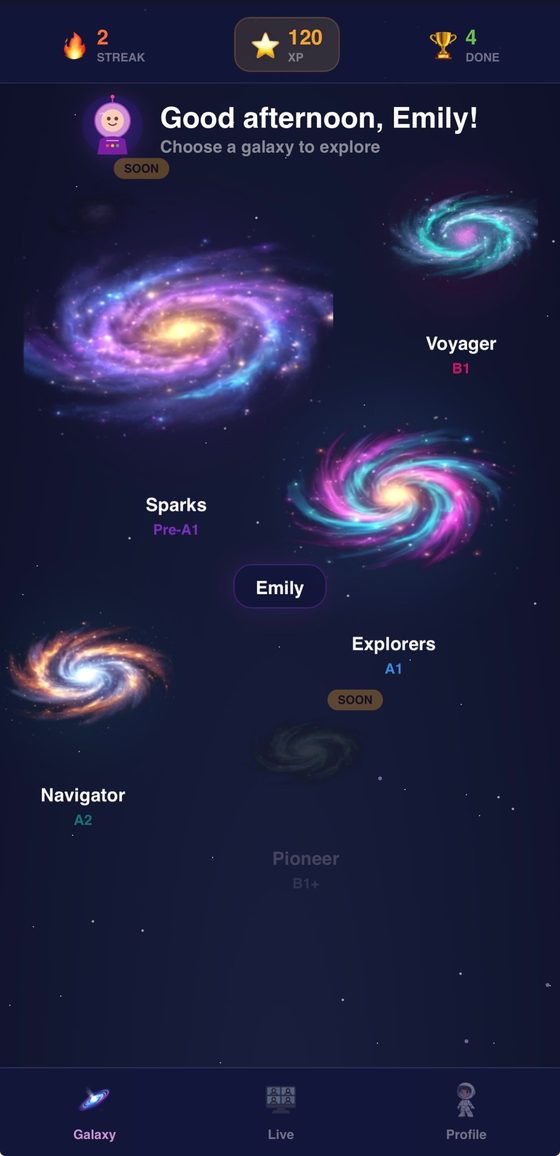
Galaxy map with levels named Sparks Pre-A1, Explorers A1, Navigator A2, Voyager B1 and Pioneer B1+
PlacementLevels as galaxiesEach CEFR level is a galaxy. Children start exactly where they are, and age is only a guide. Locked galaxies show what comes next.
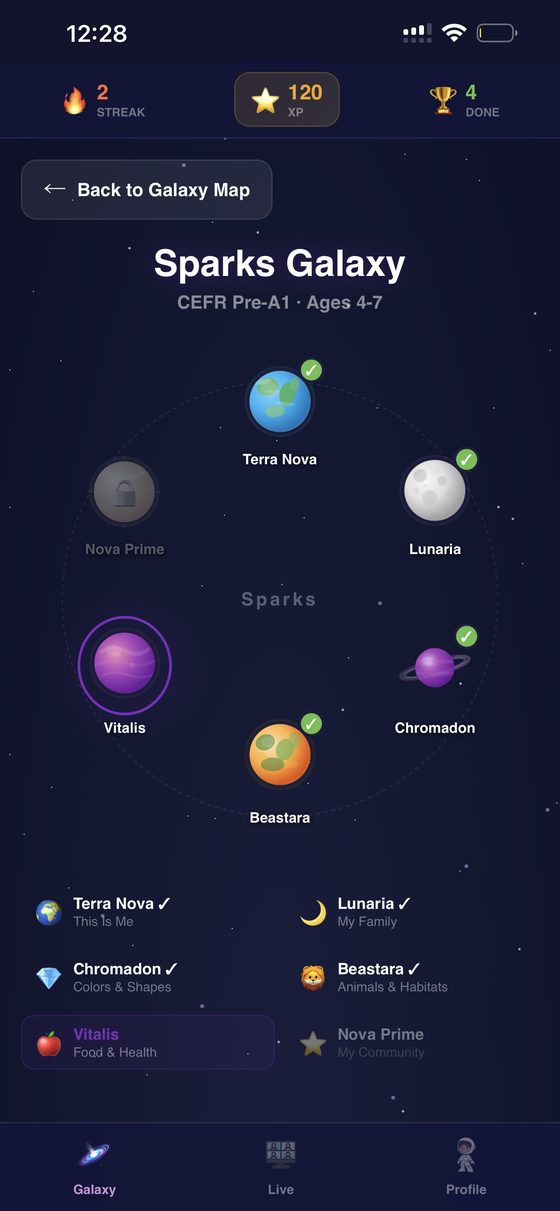
Sparks Galaxy with planets for themes like This Is Me, My Family, Colors and Shapes, Animals, and Food and Health
SequencingThemes as planetsUnits are concrete, familiar themes, from "This Is Me" to "My Community". A check mark shows mastery, and the next planet opens only then.
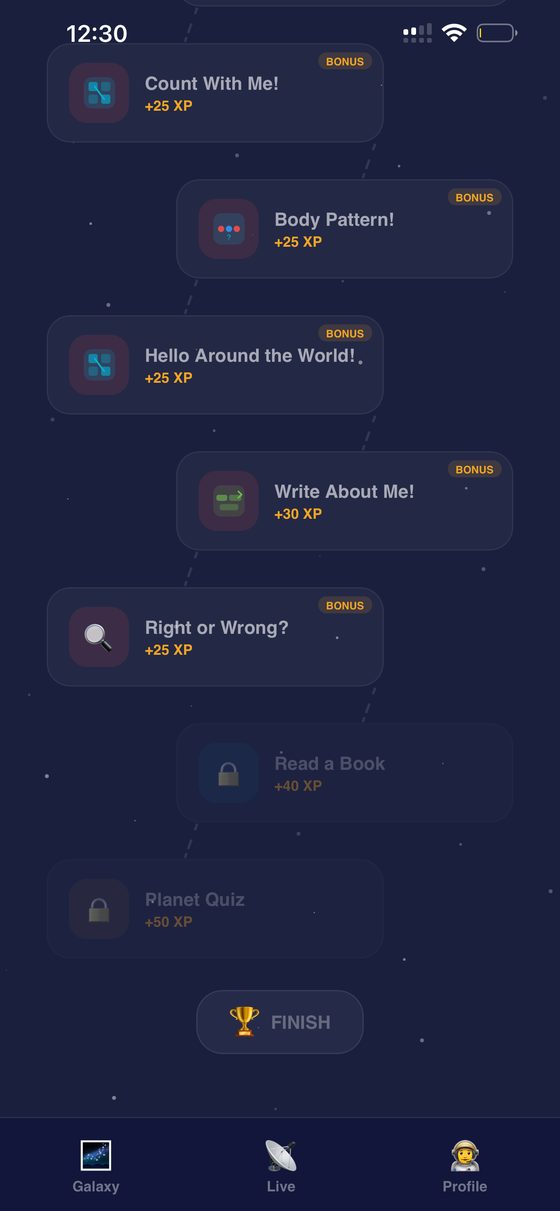
Activity path with short bonus activities worth XP, ending in a locked book and planet quiz
AttentionShort steps on a visible pathEach planet breaks into short activities of a few minutes. The reading and the quiz unlock after practice, so children arrive ready to succeed.
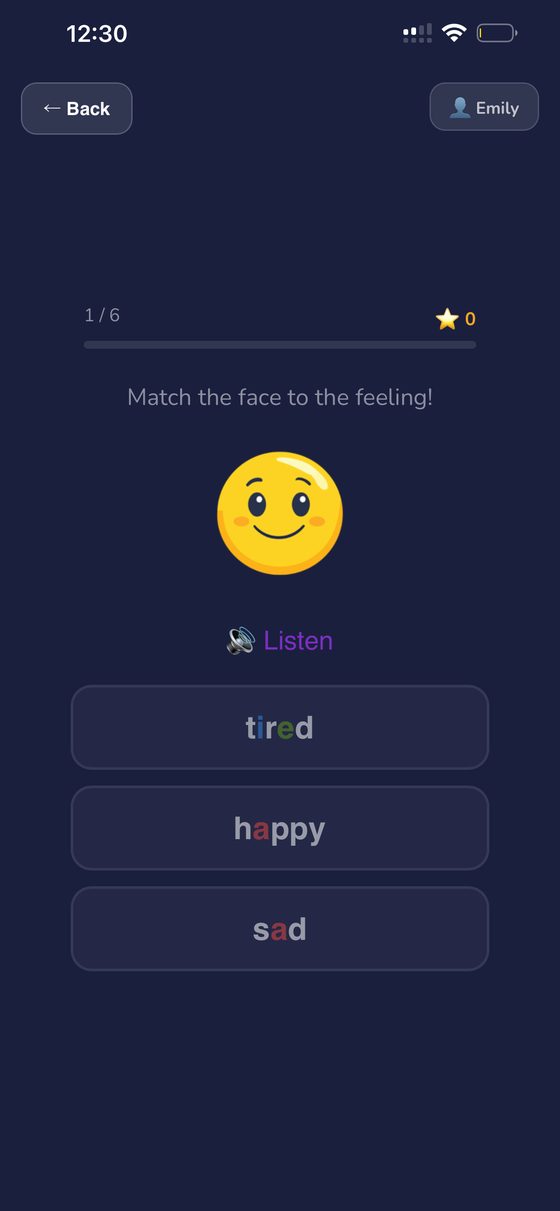
Activity asking to match a smiling face to the word happy, with a Listen button and color-coded letters
Dyslexia supportSound, image, and color togetherEvery word can be heard, matched to a picture, and read with color-coded vowels. Three channels at once is the core of multisensory reading instruction.
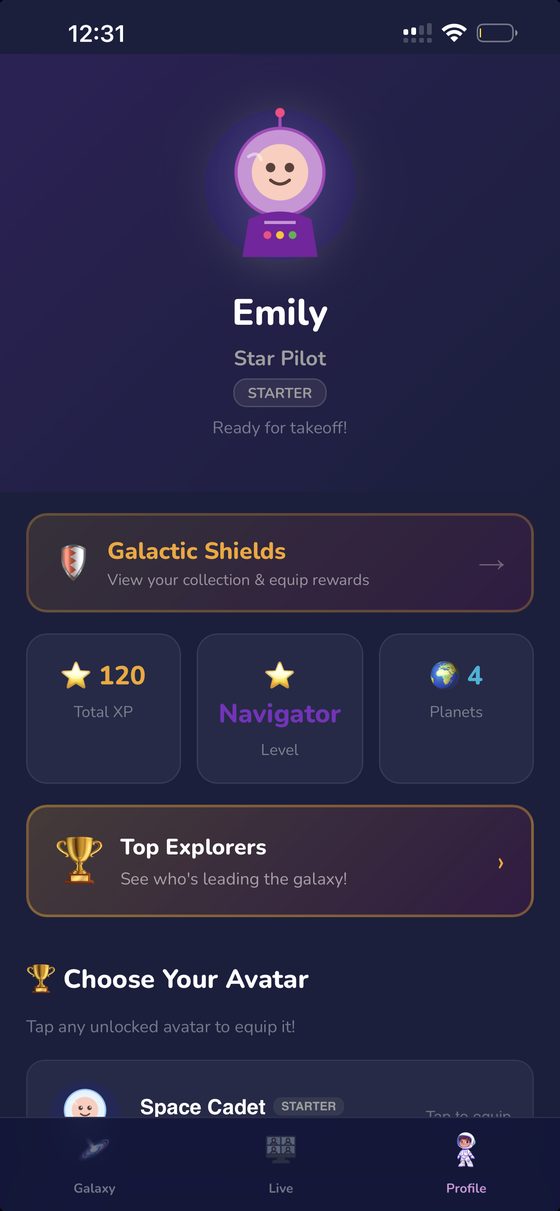
Child profile showing total XP, current level, planets completed and a leaderboard
MotivationProgress a child can seeXP, streaks, and planets completed turn effort into something concrete, which matters for children who rarely feel successful at school.
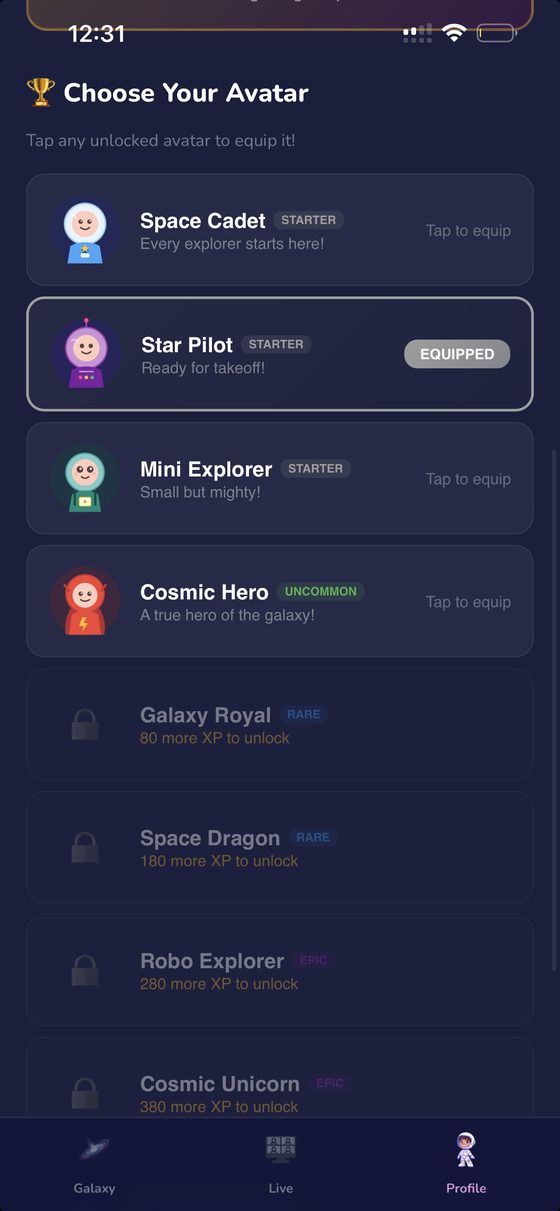
Avatar collection with starter avatars unlocked and rarer avatars locked behind XP goals
EngagementRewards tied to practiceAvatars unlock with XP, so the reward comes from consistent practice, never from purchases or luck.
For adult learners

Coral AI

Founder & learning designer
On the App Store as Miss Coral

An AI conversation tutor for the moment textbooks can't prepare you for: someone actually talking to you.

The problem

I've taught hundreds of good students who understood the material and did the practice, then froze when someone asked a real question or spoke with an unfamiliar accent. I lived it myself as a second-language speaker. The gap wasn't knowledge. It was constant, real conversation practice.

The design

Coral AI isn't a guide or a memorization tool. Learners hold real voice conversations, any time and on their own schedule, at levels from A1 to C2 and around their own interests. Coral switches to Spanish when a learner needs it, and after each chat, Coral Notes sum up corrections and progress. Behind every conversation sits a structured curriculum that guides them without them noticing, a correction model that gives feedback without breaking the flow, and mastery gates that decide when they're ready to move on. The tutor speaks with an AI clone of my voice, so learners practice with a teacher they already trust.

The result

Live on the App Store as "Miss Coral: Speak English", with 46 downloads and no paid marketing or promotion. I'm now building a pronunciation module and AI-assisted writing feedback.

AI-personalized learningAI voice cloningConversation practiceMastery gatesAdult learning

Built so speaking feels safe, and progress feels real

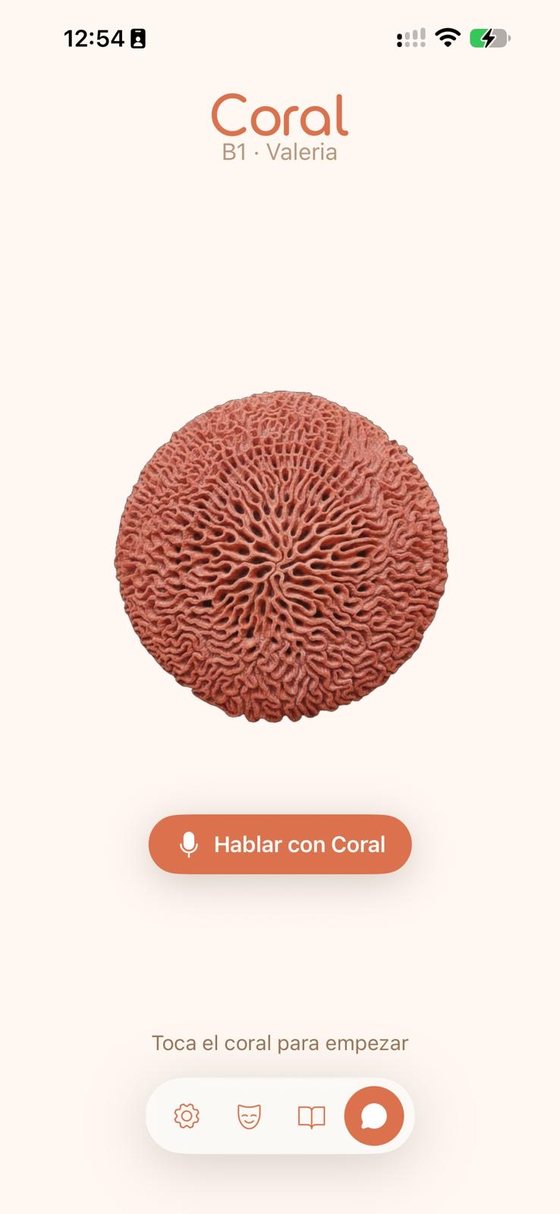
Coral AI home screen with a single button, Talk with Coral
Low frictionOne tap to start talkingNo menus or drills between the learner and practice. The screen has one job: start a conversation.
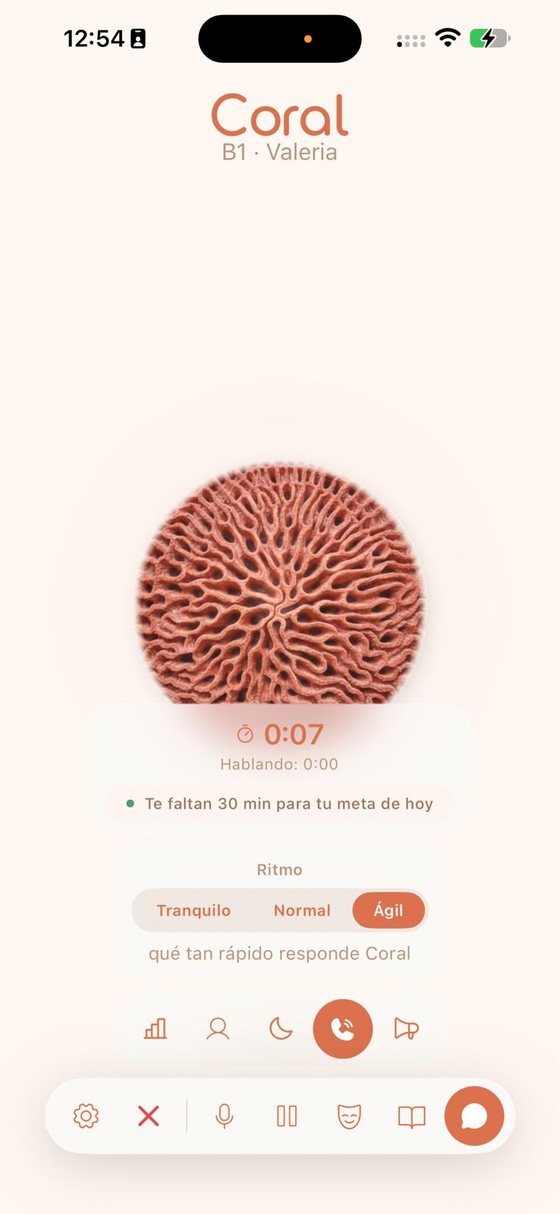
Live voice conversation with a timer, daily goal, and a pace control set to Calm, Normal or Fast
Adaptive paceThe learner sets the speedA pace control lets learners slow Coral down or speed her up, so beginners aren't rushed and advanced learners train for real-life speed.
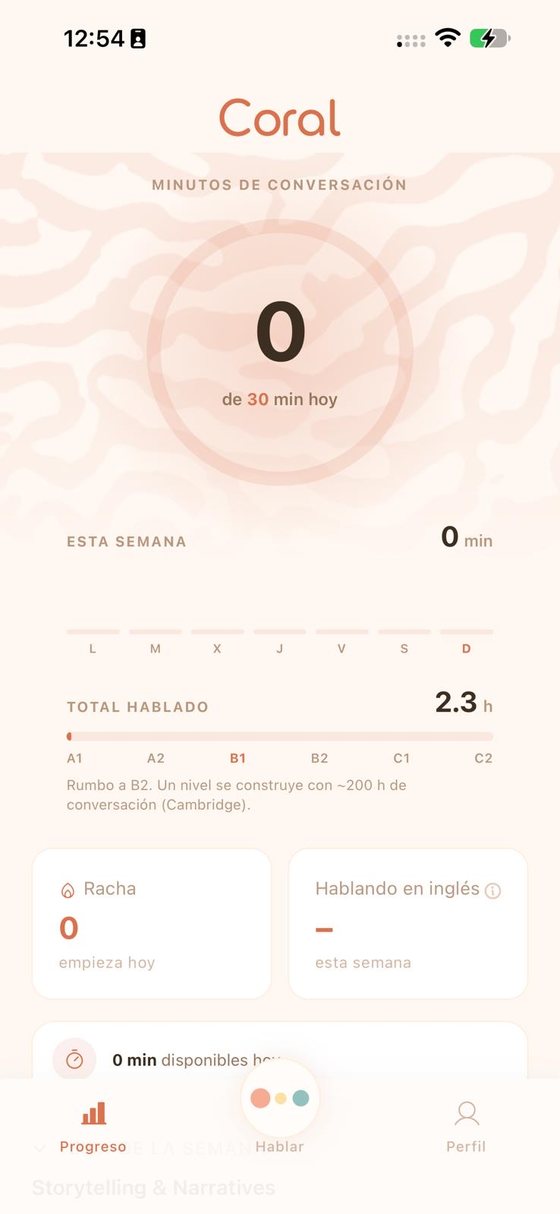
Progress screen showing daily conversation minutes, weekly minutes, and total hours on a scale from A1 to C2
MeasurementProgress counted in speaking timeDaily minutes, streaks, and total hours on an A1 to C2 scale, based on Cambridge's estimate of about 200 hours of practice per level.
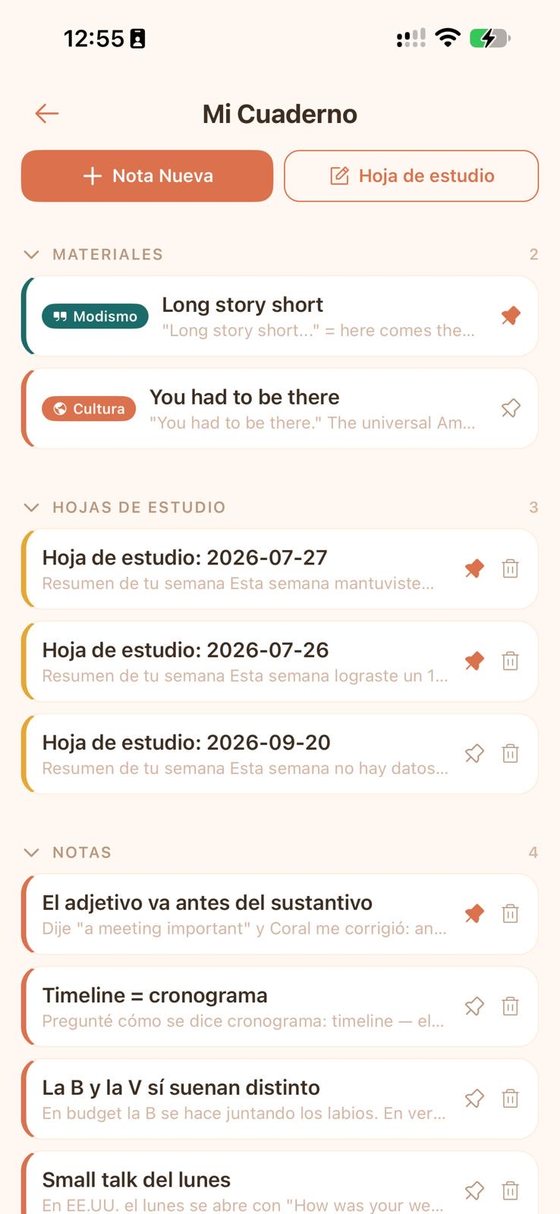
Notebook with saved idioms, culture notes, weekly study sheets, and notes from corrections
RetentionA notebook that writes itselfCorrections, idioms, and culture tips from each conversation become notes and weekly study sheets, so nothing learned gets lost.
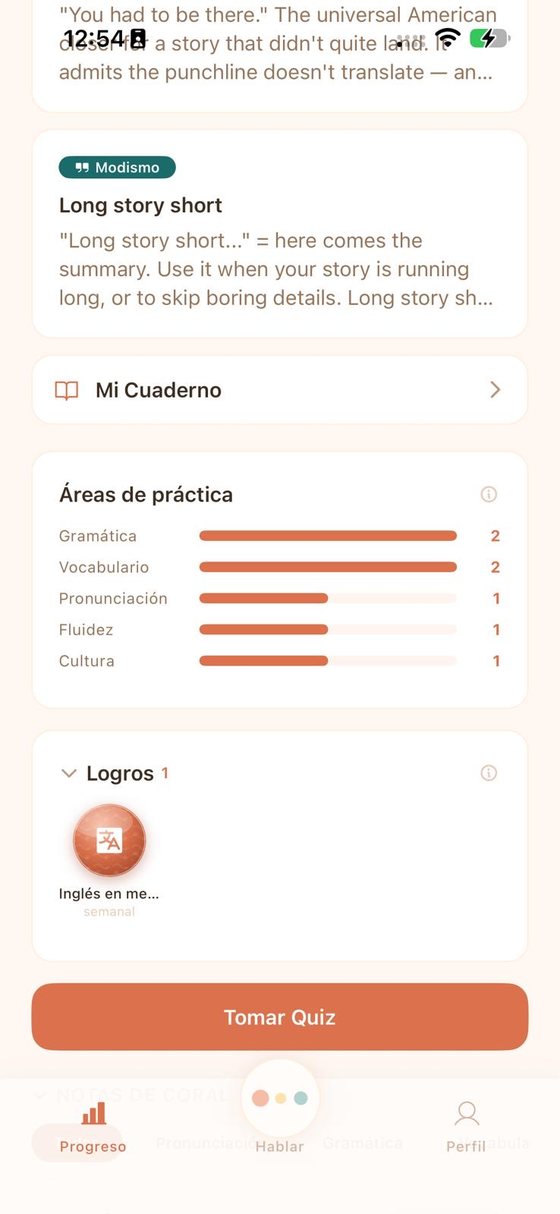
Practice areas showing grammar, vocabulary, pronunciation, fluency and culture, with achievements and a Take Quiz button
Skill trackingFive skills, one pictureGrammar, vocabulary, pronunciation, fluency, and culture are tracked separately, so learners see exactly where to focus next.
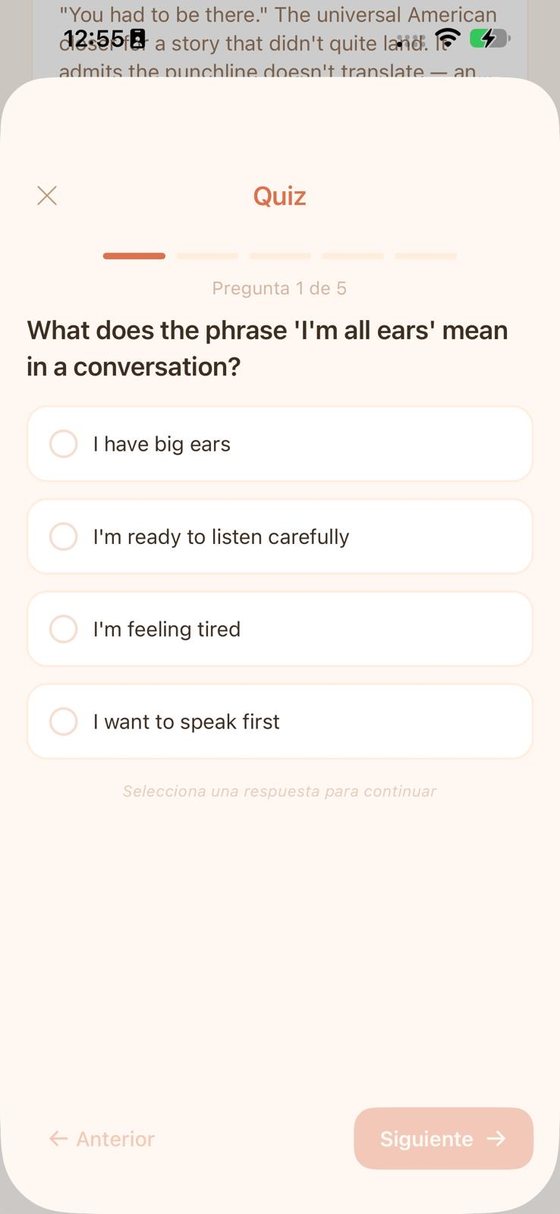
Five-question quiz asking what the phrase I'm all ears means
Retrieval practiceQuizzes built from real talkShort quizzes bring back the expressions learners met in conversation, so new language moves into long-term memory.
For teachers

Montessori Guide

Creator, Pinnacle Montessori of Georgetown
2026

A just-in-time coach that helps non-certified teachers present Montessori materials with confidence.

The problem

Most teachers at my school, including me, aren't Montessori-certified. Presenting a material well depends on details: the exact words, the order of steps, when a child is ready, and how the shelves should be arranged. Without that knowledge at hand, quality varies from classroom to classroom.

The design

I digitized the full set of Montessori material albums into quick, step-by-step guides that teachers open on an iPad in the middle of class, the way you'd use a job aid. The app also tracks each child's progress, suggests who is ready for which presentation, and shows how to arrange the shelves.

The result

Piloted in my own classroom. In November 2026 I'm leading the school-wide rollout, starting with a hands-on training session for all 23 teachers.

Performance supportJob aidsFacilitator trainingProgram rollout

Expert guidance at the moment of need

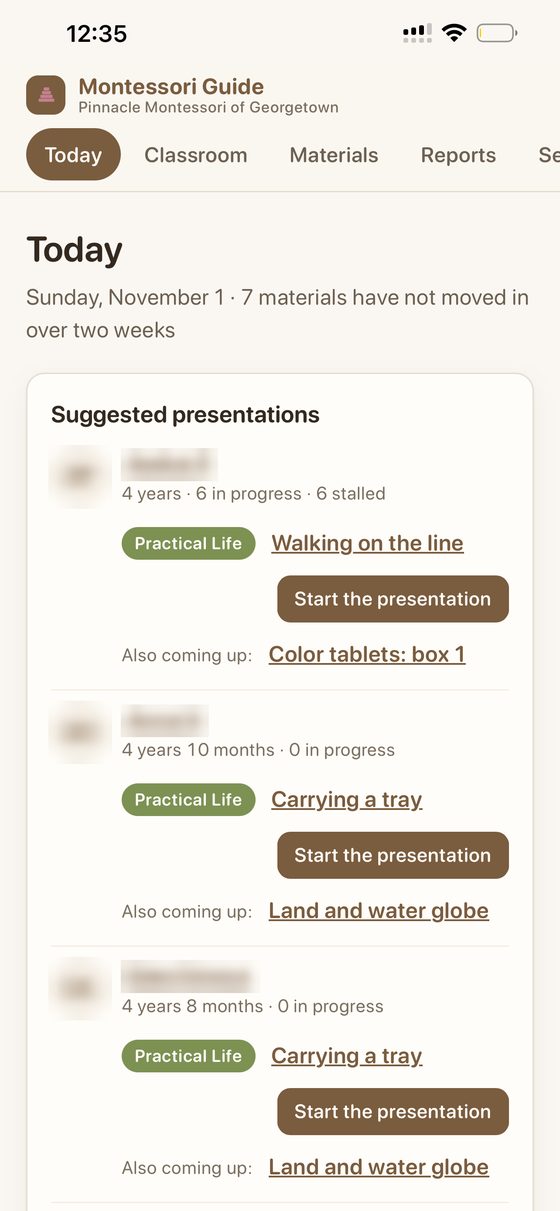
Today view suggesting the next presentation for each child, with a button to start it. Student names are blurred.
Decision supportWho is ready for whatEach morning the app suggests the next presentation for every child and flags materials that haven't moved in two weeks.
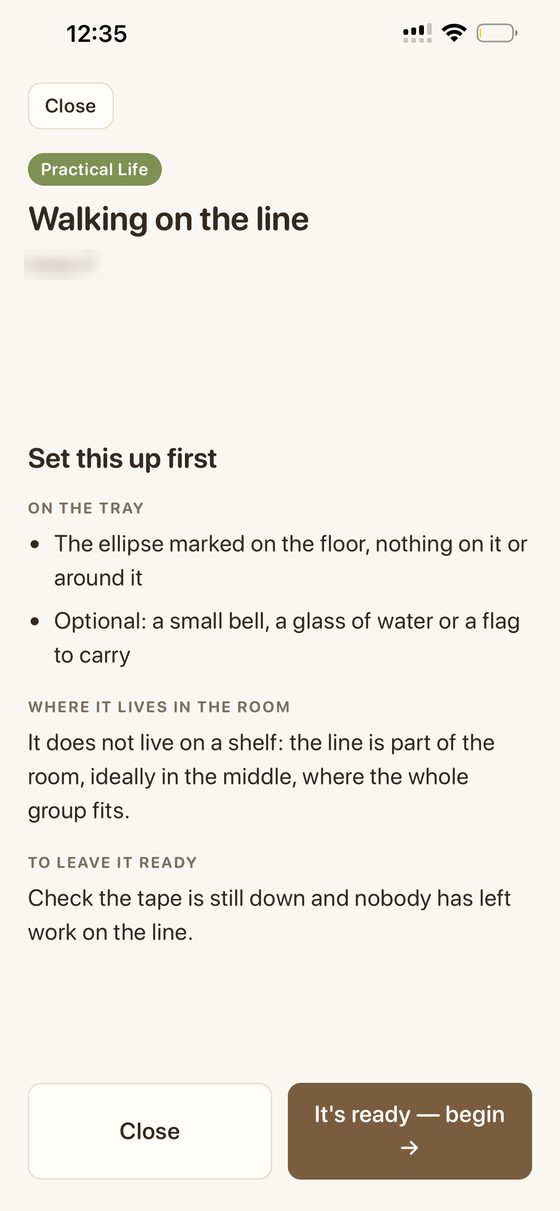
Preparation checklist for the Walking on the line presentation: what to set up, where it lives in the room, and how to leave it ready
Job aidPrepare before you presentA short checklist covers what to set out, where the material lives, and how to leave it ready for the next child.
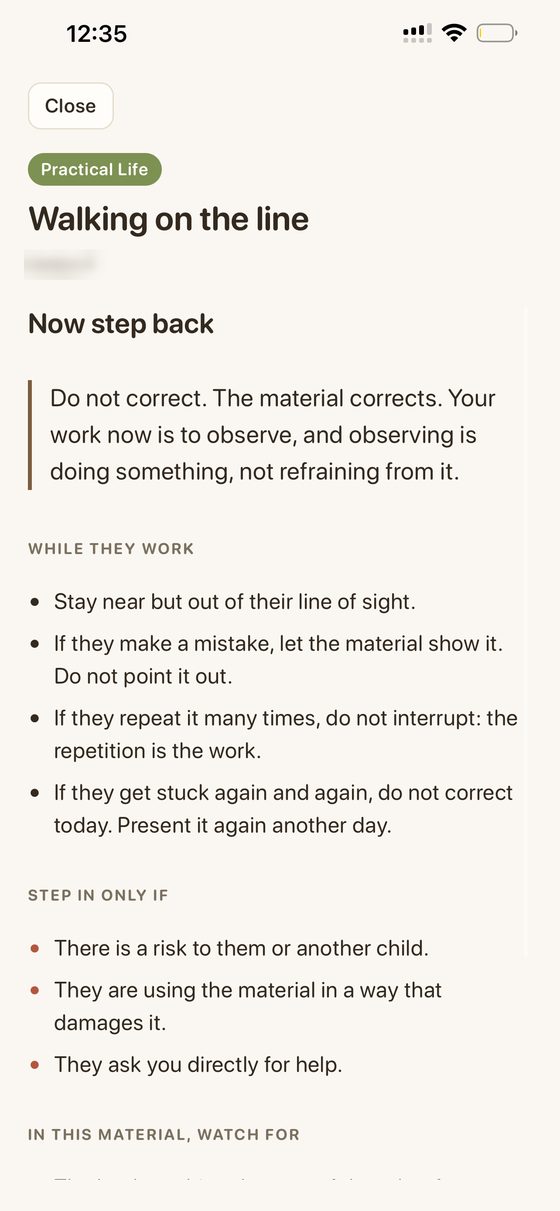
Guidance after the presentation: do not correct, observe, and step in only if there is a risk, damage, or the child asks for help
PedagogyKnow when to step backThe hardest Montessori habit for new teachers is not correcting. The guide says what to watch for and exactly when to step in.
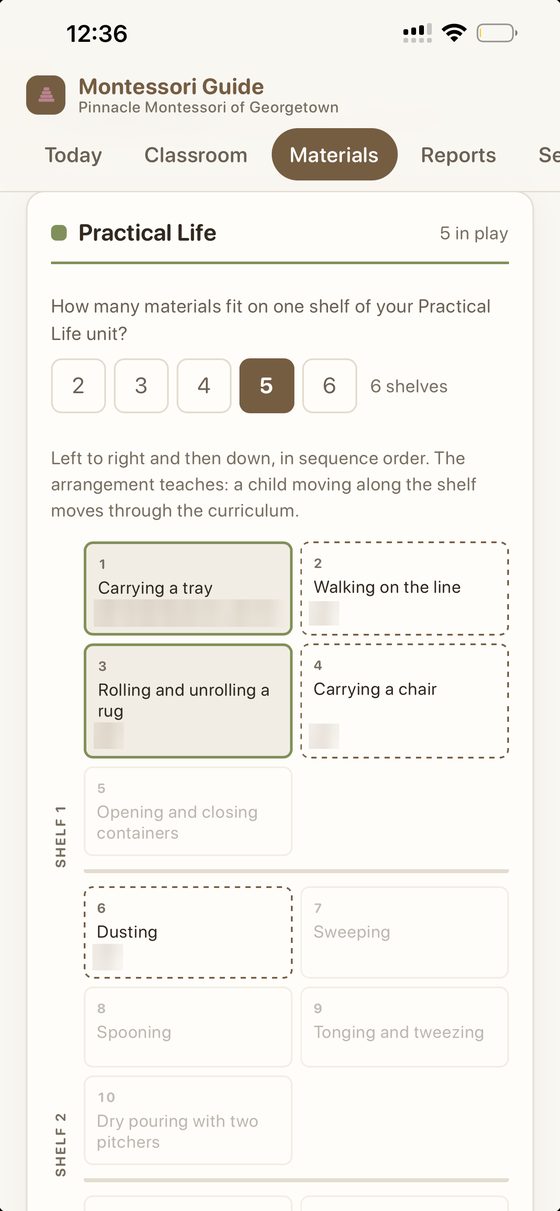
Practical Life shelf layout showing materials in curriculum order, left to right and top to bottom
EnvironmentShelves that teach the sequenceTeachers enter their shelf size and the app lays out materials in curriculum order, so moving along the shelf means moving through the curriculum.
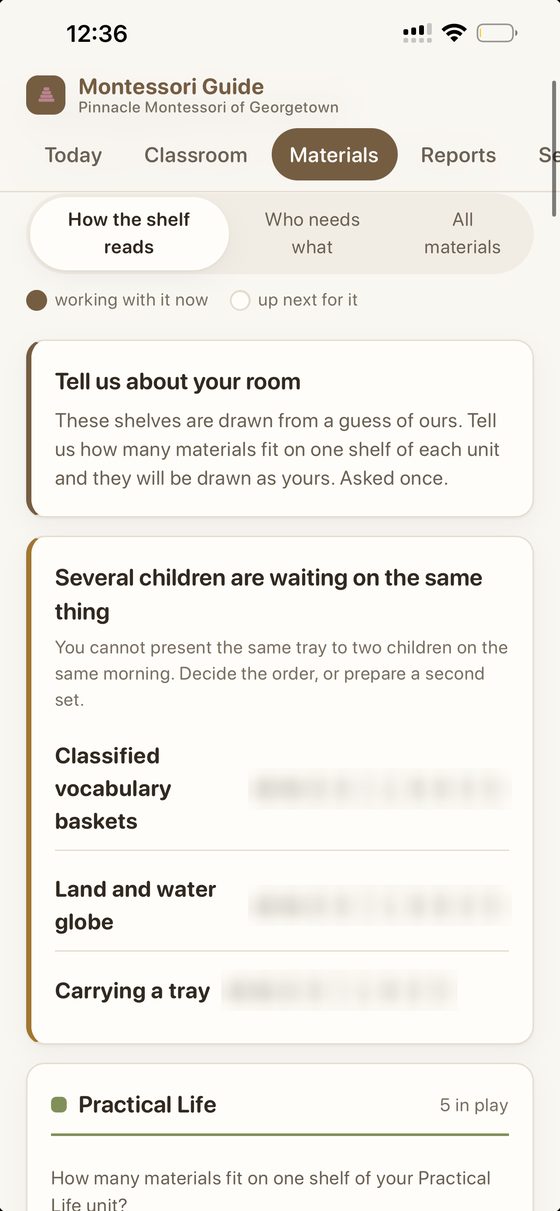
Alert that several children are waiting for the same material, with a prompt to decide the order or prepare a second set. Student initials are blurred.
Classroom planningWhen several children need the same trayThe app spots conflicts before they happen and prompts the teacher to set an order or prepare a second set.
Results from the November training with 23 teachers coming soon.
For working professionals

CogniBoost

Founder & learning designer
2022 to present

A structured English program for adults who need the language for their careers.

The problem

Busy professionals need English for real work situations, but most courses are either too casual to build skills or too rigid to fit around a job.

The design

A CEFR A1 to C1 platform with a placement test, short lessons, and projects for all four skills, paired with live Conversation Labs. Each day the platform builds a short mission from the learner's own feedback, and AI role-plays let them rehearse real situations before they face them.

The result

A complete path from beginner to advanced for working professionals, and the foundation that became Coral AI.

Blended learningCEFR A1 to C1Personalized practiceAI role-playMastery assessment

Designed for adults with jobs, not unlimited time

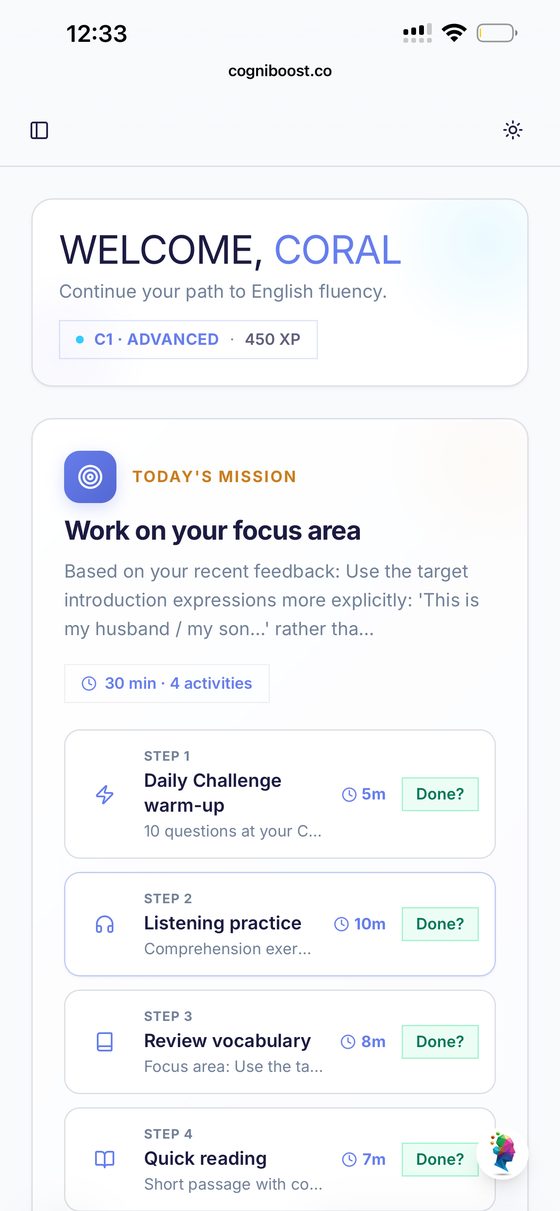
Today's mission: a 30-minute plan of four activities built from the learner's recent feedback
PersonalizationA daily mission from your own feedbackEach day brings 30 minutes in four short steps, aimed at the exact skill the learner's last feedback flagged.
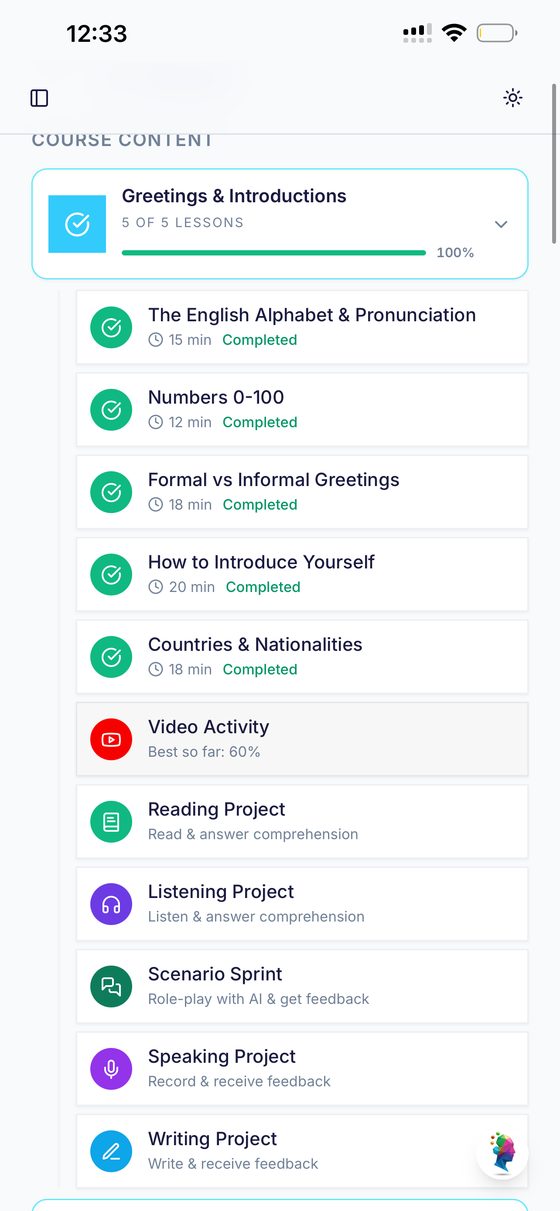
Unit with five short lessons followed by reading, listening, AI role-play, speaking and writing projects
Skills integrationEvery unit ends in real useShort lessons lead into reading, listening, speaking, and writing projects, plus a Scenario Sprint role-play with AI feedback.
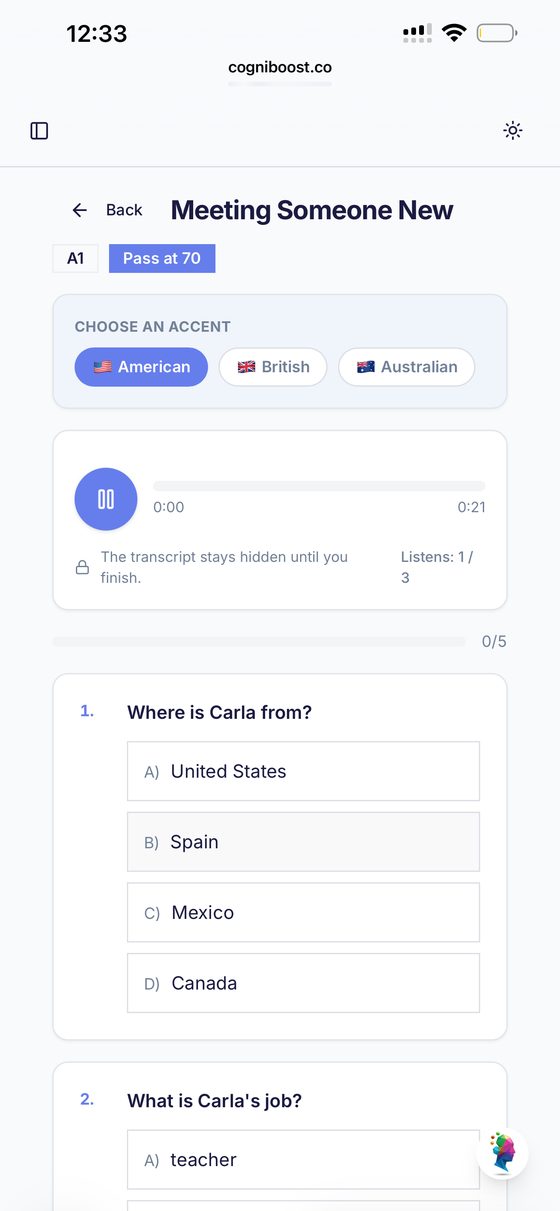
Listening activity where the learner chooses an American, British or Australian accent, with the transcript hidden and three listens allowed
Real-world listeningChoose the accentLearners hear American, British, or Australian speakers. The transcript stays hidden until they finish, with three listens, so they train the ear and not the eyes.
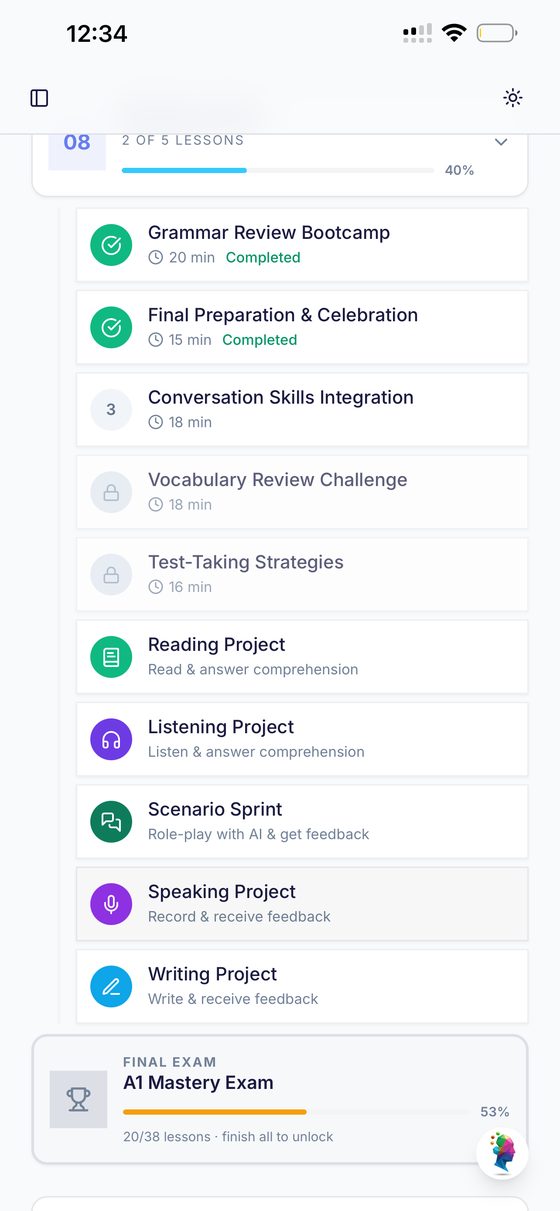
Lessons unlock in order and the A1 Mastery Exam unlocks only after all lessons are complete
MasteryEarn the next levelLessons unlock in sequence and each level ends in a mastery exam with a passing score of 70, so progress reflects real skill.

Also built with AI

2026
For parents

Tocomo

A baby food app that teaches parents how to prepare safe, age-appropriate meals. Recipes, portions, and cutting guides adapt to the baby's age, risky steps are flagged, and a food introduction guide walks parents through allergens day by day. Parents can also log what their baby has eaten and send a week's shopping list to Instacart in one tap. Designed and built with AI tools, applying the same idea as my learning products: clear, guided steps at the moment someone needs them.

Teaching parents the why, not just the recipe

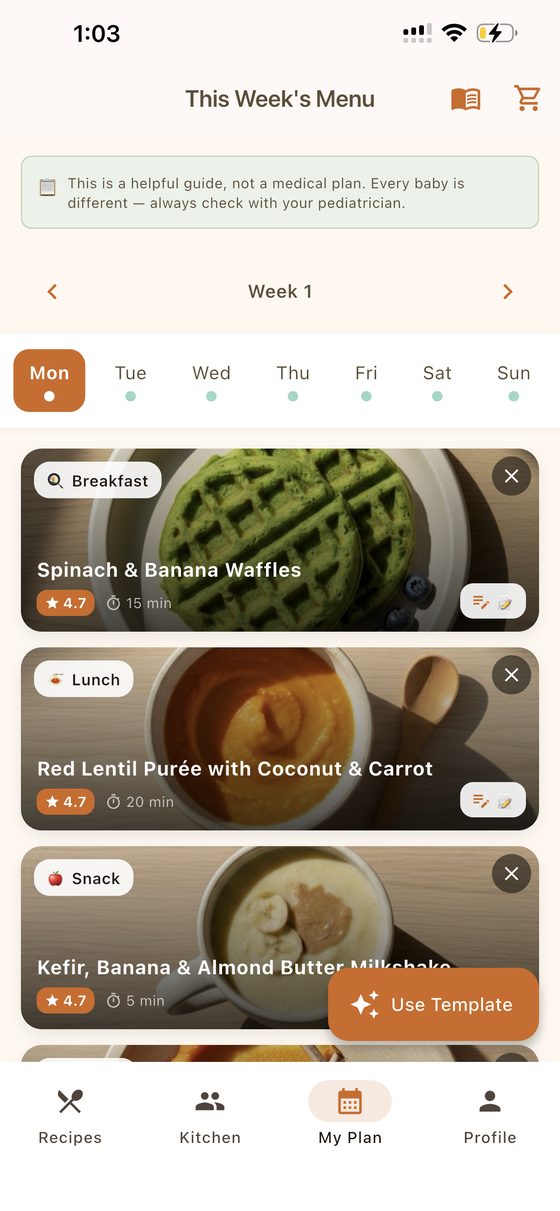
Weekly menu with breakfast, lunch and snack for each day, and a note that it is a guide, not a medical plan
PlanningA week planned for youA ready-made weekly menu, with a clear reminder that it's a guide and every baby should follow their pediatrician's advice.
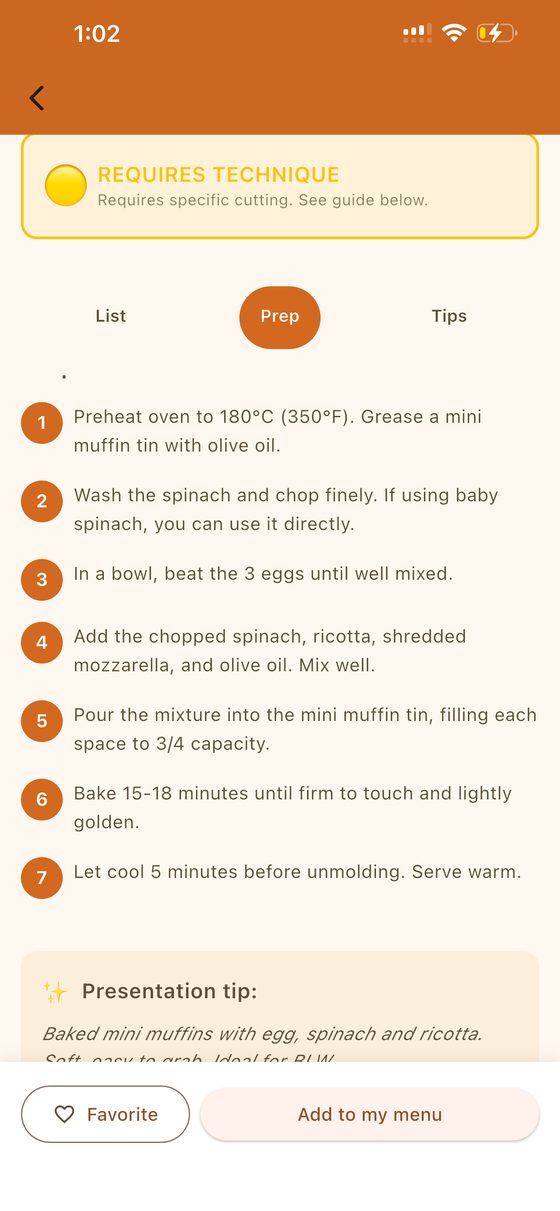
Numbered preparation steps for egg and spinach mini muffins, flagged as requiring technique
Job aidShort, numbered stepsEach recipe breaks into short steps, and a "requires technique" flag tells parents when to slow down and read the guide.
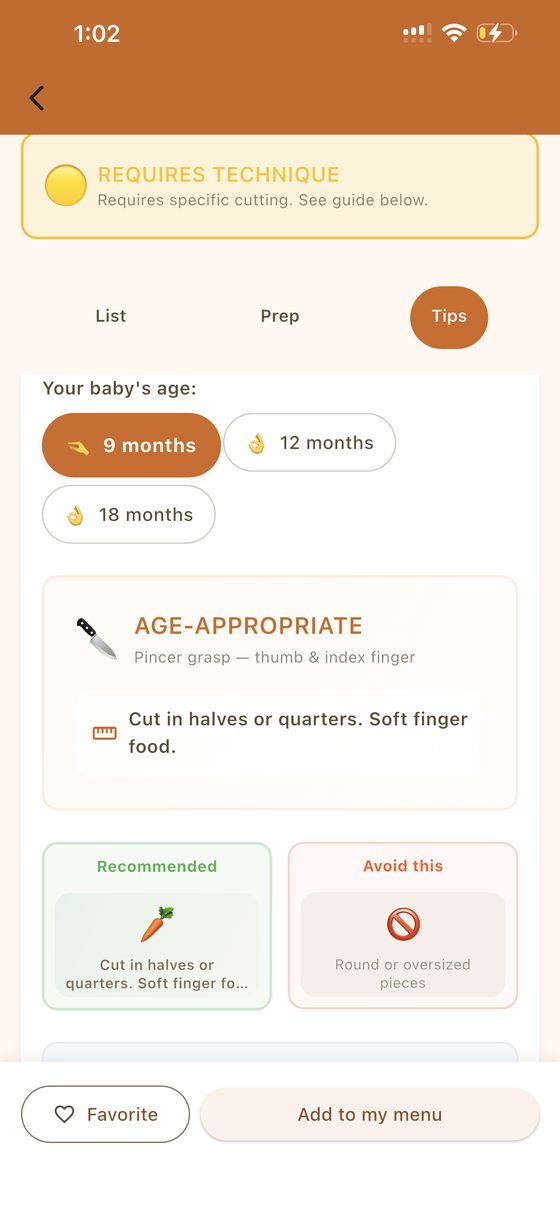
Cutting guide that changes by baby's age, showing the recommended cut and what to avoid
Adaptive guidanceThe cut changes with the babyParents pick their baby's age and see the right cut for that stage of motor development, what to do, and what to avoid.
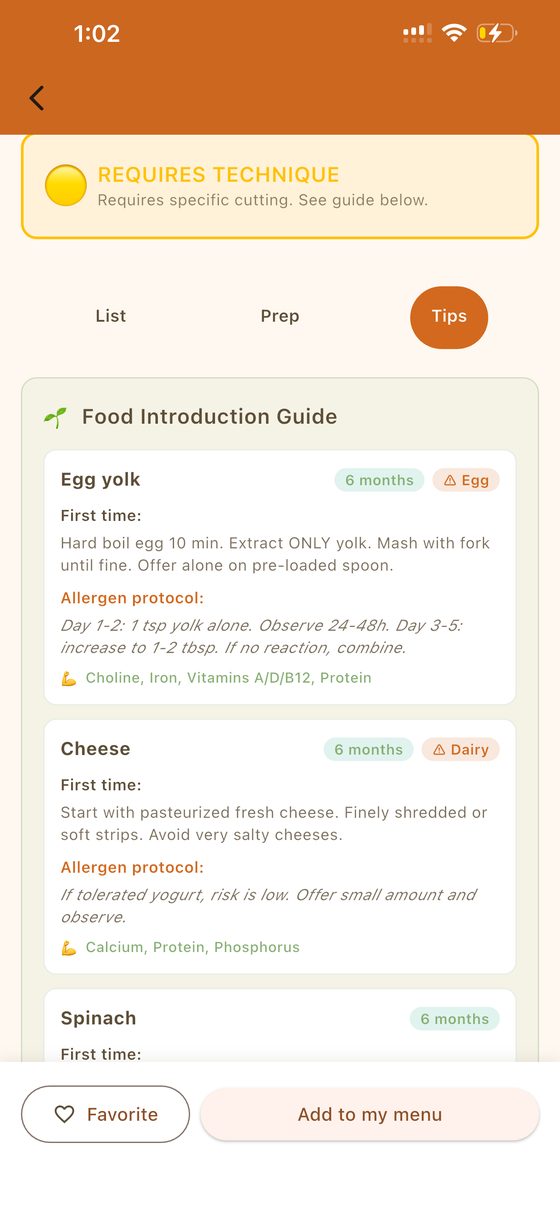
Food introduction guide with first-time instructions, allergen protocol, and nutrients for egg yolk and cheese
ScaffoldingNew foods, one step at a timeFor each new food: how to offer it the first time, a day-by-day allergen protocol, and the nutrients it provides.

Earlier work

2020 to 2022
Punta Cana, DR

Curricular adaptations at Bavaro Bilingual School

As school psychologist and counseling coordinator, I designed curricular adaptations for students with learning difficulties and other conditions, working with teachers, students, and families to reach measurable progress. I also launched a language and psychopedagogy classroom.

2016 to 2019
Santiago, DR

Toddler English program at Iberia Institute School

Designed the school's English program for children ages 2 to 4, based on Common Core standards. The school still uses it today.

2018 to 2022
Santiago, DR

Our Zone Education

Founded and ran English summer camps and after-school programs for children ages 4 to 8, designing the activities and hiring the staff.

2024
Research

Bilingual reading comprehension study

Master's thesis: a longitudinal study of direct and indirect teaching strategies for reading comprehension in English and Spanish, measured with PROLEC-R and DIBELS 8.